
Have you ever wondered how SketchUp designers and architects bring their visions to life faster, with stunning results? The secret lies in the power of plugins and SketchUp extensions. These tools can streamline your workflow, enhance functionality, and save countless hours by automating repetitive tasks or improving visualization.
But with thousands of plugins available for SketchUp, which ones are worth trying?
In this post, we’ll explore the must-have free SketchUp plugins every designer should add to their toolkit. Whether you’re a beginner learning the ropes or an experienced designer working on complex visualization projects, these tools will elevate your design process.
Ready to level up your SketchUp experience? Let’s explore the top free SketchUp plugins you should try!
Benefits of Using Free SketchUp Plugins
SketchUp is already one of the most intuitive 3D modeling tools, but its real magic lies in its plugins. Plugins extend functionality, streamline repetitive processes, and make it easier to visualize and conceptualize ideas.
- Time-Saving Automation: Plugins can automate tedious and repetitive tasks. Instead of manually creating elements like trees, walls, or furniture, plugins can generate these models with a few clicks.
- Enhanced Visualization: Tools for rendering, shadowing, and scene manipulation make your models look realistic.
- Customization: Plugins allow you to tailor SketchUp to suit your specific needs, like architectural visualization, furniture design, or site planning.
- Increased Functionality: The default SketchUp interface is powerful, but plugins can unlock advanced features that you might not find built-in.
So, whether you’re an architect, landscape designer, or interior designer, the right plugin can transform how you work with SketchUp. Now let’s look at the best free ones.
Top Free SketchUp Plugins Every Designer Should Try
Discover the best free SketchUp plugins for designers should try. From visualization to parametric modeling, optimize your workflow today!
Table of Contents
1. Eneroth
Category: Visualization / Parametric Modeling
Best for: Architectural visualization and parametric modeling
Eneroth Grasshopper allows designers to integrate parametric modeling capabilities into SketchUp seamlessly. This is particularly useful for creating complex geometric patterns, organic curves, or landscape models that align with natural topography.
Features:
- Parametric design integration
- Dynamic modeling options
- Easy to use with pre-defined settings
- Great for designers and architects focusing on advanced design aesthetics
Why You Need It:
Architects and landscape designers can use Eneroth Grasshopper to model organic shapes, terrain manipulation, and unique structural forms without having to manually sculpt geometry.
2. CleanUp³
Category: Optimization
Best for: Model cleaning and performance improvements
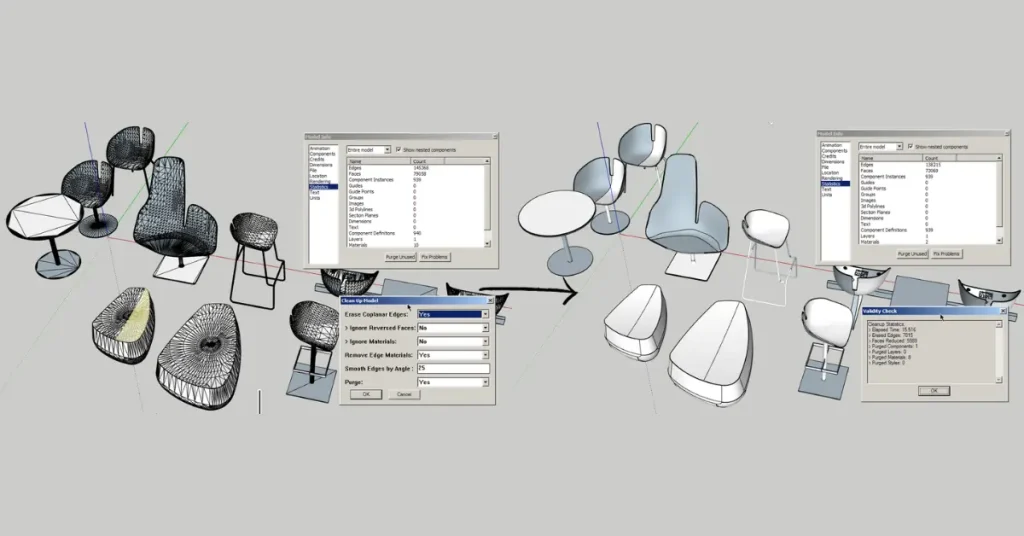
When working on SketchUp models, especially large-scale projects, unnecessary geometry or duplicate objects can slow down your workflow. That’s where CleanUp³ comes into play.
Features:
- Deletes unused components, faces, and other extraneous data
- Optimizes models for smoother rendering
- Improves SketchUp performance for heavy files
Why You Need It:
Large SketchUp models can become bogged down by redundant or unnecessary geometry. Using CleanUp³ will keep your models fast and efficient—key for seamless navigation and visualization.
3. Skatter
Category: Vegetation & Landscape Modeling
Best for: Adding natural elements (trees, grass, flowers)
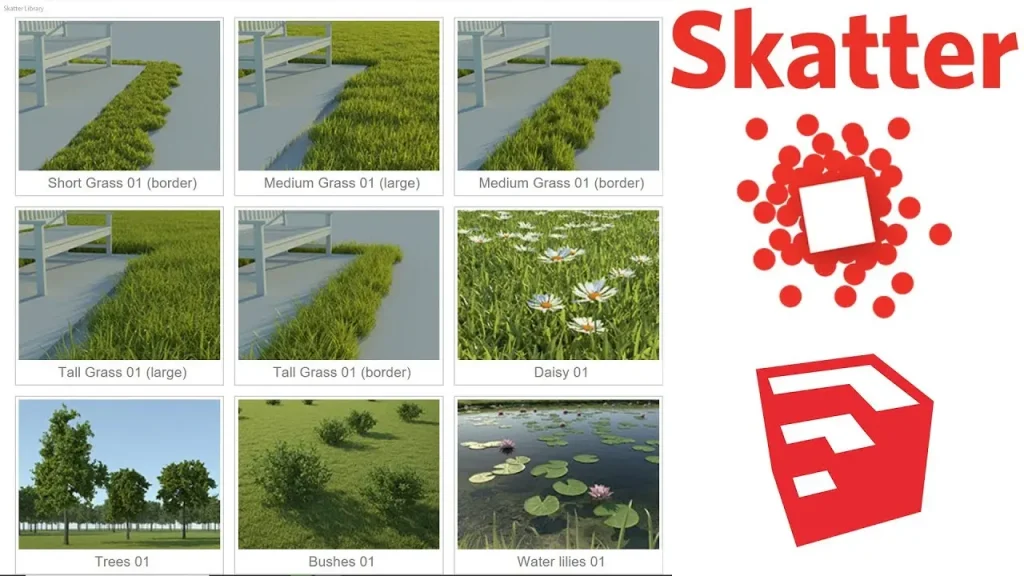
Landscape architects and designers will love Skatter. This tool is a game-changer when it comes to populating a space with vegetation, trees, grass, or other natural elements quickly and efficiently. Instead of spending hours modeling individual trees, Skatter lets you distribute them across a landscape with just a few clicks.
Features:
- Procedural vegetation modeling
- Automatically distribute vegetation in real-world scenarios
- Great for landscape architects & nature-focused designs
- Creates realistic natural environments
Why You Need It:
Landscapes rely on realistic vegetation to look natural and inviting. Skatter simplifies this process, so you can populate terrains and gardens without repetitive modeling.
4. Profile Builder 3
Category: Parametric Modeling for Structures
Best for: Wall creation, repetitive structural modeling, and design visualization
Profile Builder 3 offers an intuitive way to create parametric profiles (walls, fences, moldings, and more) without manually modeling each component. It’s great for both architectural visualization and 3D printing workflows.
Features:
- Simplifies parametric wall creation
- Ideal for creating custom fences, trims, and railings
- Speeds up workflows with repetitive structural tasks
Why You Need It:
Time is essential in design projects. With Profile Builder 3, creating continuous structures becomes faster, and you can focus on refining the design instead of drafting individual elements manually.
5. V-Ray for SketchUp Free Version
Category: Rendering / Visualization
Best for: High-quality rendering previews and photorealistic visualizations
While not fully free, the free trial versions and scaled-down rendering tools of V-Ray can dramatically improve how SketchUp users visualize their concepts. They allow you to generate photorealistic renderings that can help clients visualize projects in greater depth.
Features:
- Real-time rendering previews
- Realistic lighting and shadow effects
- Enhanced photorealistic visualization
Why You Need It:
Good visualization is essential for client presentations. V-Ray lets you transform basic models into highly detailed, realistic 3D visualizations.
6. 1001bit Tools
Category: Modeling / Architectural Detailing
Best for: Quick architectural detailing and 3D modeling
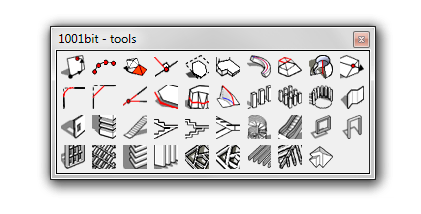
1001bit Tools is one of the most versatile and useful free plugins available for SketchUp. It’s an all-in-one toolset designed for architectural modelers and designers, focusing on streamlining complex and repetitive modeling tasks.
Features:
- Easily create walls, staircases, and architectural details
- Rapidly generate parametric geometry
- Create openings like doors/windows with ease
- Intuitive UI for beginner-friendly use
Why You Need It:
Modeling intricate architectural elements like staircases, curtain walls, and multi-story layouts can become time-consuming without the right tools. 1001bit Tools simplifies this process, saving you hours while maintaining precision.
7. RoundCorner
Category: Geometry / Detailing
Best for: Adding smooth, rounded edges to geometry
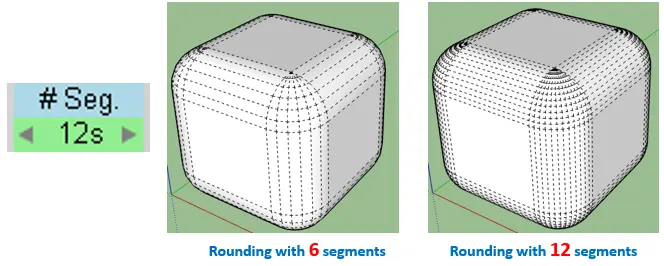
The RoundCorner plugin is perfect for designers who want to add aesthetic appeal to their 3D models by rounding sharp edges or corners. This plugin is a simple yet powerful way to ensure that models look sleek, polished, and realistic.
Features:
- Automatically rounds edges and corners
- Adjust the radius of curves with ease
- Works well for furniture, buildings, or site modeling
Why You Need It:
Sharp, boxy edges can make models look unrealistic or unfinished. RoundCorner helps you add realistic finishes and smoother curves to your designs.
8. SubD
Category: Advanced Modeling / Mesh Modeling
Best for: Advanced organic shapes, curves, and subdivisions
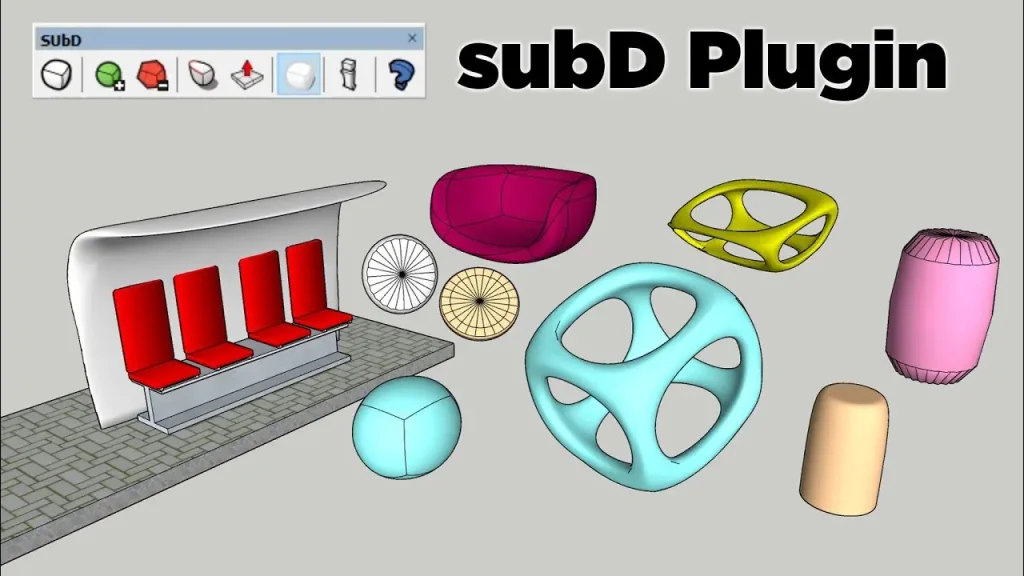
The SubD plugin allows SketchUp users to subdivide surfaces to create smooth, organic curves and shapes. It’s excellent for advanced modeling tasks like creating furniture, intricate organic landscapes, and conceptual architectural designs.
Features:
- Subdivide meshes for advanced organic shapes
- Smooth curved surfaces effortlessly
- Great for furniture modeling and conceptual design exploration
Why You Need It:
SubD enables you to take basic geometric models and transform them into smooth, organic forms—ideal for furniture design, conceptual art, or organic architecture visualization.
9. TT_Lib & Tools
Category: Modeling / Workflow Efficiency
Best for: Enhancements to default SketchUp tools and utilities
ThomThom’s TT_Lib and Tools are incredibly versatile SketchUp extensions that offer a variety of essential features to extend SketchUp’s default capabilities. These tools are indispensable for users seeking advanced modeling workflows and increased productivity.
Features:
- Advanced edge creation and management
- Enhanced drawing tools for geometry manipulation
- Speed up repetitive modeling tasks
Why You Need It:
With TT_Lib and ThomThom’s tools, you can clean up geometry, manage edges, and optimize your models with intuitive commands. Perfect for users of all experience levels.
10. LightUp
Category: Visualization / Lighting Effects
Best for: Adding lighting realism to renderings
SketchUp doesn’t always have advanced lighting effects built-in. LightUp allows designers to simulate lighting sources effectively—essential for creating realistic renderings and visualizations.
Features:
- Simulate various types of lighting (ambient, sunlight, artificial light, etc.)
- Adjust shadows and brightness for photorealistic renderings
- Preview lighting changes in real-time
Why You Need It:
Realistic lighting can dramatically elevate a 3D rendering or visualization. With LightUp, you can control brightness, shadows, and light placement without needing external software.
11. FredoScale
Category: Scaling / Transformations
Best for: Precise object transformations and scaling
The FredoScale plugin offers advanced scaling and transformation tools for 3D models. It provides options that aren’t available in native SketchUp, making resizing and object manipulation much simpler and more flexible.
Features:
- Non-uniform scaling across objects
- Advanced transformations for multiple selected items
- Intuitive and user-friendly interface
Why You Need It:
Designs often need resizing for context or adaptation to new projects. FredoScale allows designers to scale elements quickly while maintaining proportions or applying transformations to groups/objects.
FAQs
Q: How do I install SketchUp plugins?
Installing SketchUp plugins is simple:
- Open SketchUp and go to Window > Extension Manager.
- Click on Install Extension and choose the downloaded plugin file (.rbz).
- Restart SketchUp to activate the plugin.
Alternatively, you can use the SketchUcation Extension Store or the Extension Warehouse for one-click installation.
Q: What is the best free SketchUp plugins for landscape designers?
For landscape designers, Skatter is a must-have. It excels in quickly populating models with realistic vegetation, trees, and grass, saving hours of manual modeling time. Tools like 1001bit Tools and RoundCorner are also great for creating organic designs and architectural details.
Q: Are these plugins compatible with all versions of SketchUp?
Most plugins are compatible with the latest SketchUp versions and some earlier versions (like SketchUp 2020 or 2021). However, it’s always best to check the plugin’s description for compatibility details.
Q: Are there any risks in using plugins?
The primary risk comes from downloading plugins from unverified sources, which can lead to malware or compatibility issues. Always download plugins from reputable platforms like the SketchUcation Extension Store or the Extension Warehouse.
Q: What’s the difference between free and paid plugins?
Free plugins offer basic features and are often sufficient for most design tasks. Paid plugins typically include advanced functionality, enhanced support, and regular updates for professional-grade performance.
Conclusion
With the plugins listed above, you can enhance SketchUp’s usability, simplify complex design tasks, and take your design projects to the next level. Free SketchUp plugins offer the edge needed to save time, reduce repetitive design processes, and ensure visually stunning results.
From visualization tools like Skatter and V-Ray to parametric modeling with Grasshopper and Profile Builder 3, the right plugins can elevate your design workflow significantly.
Which plugin will you try first? Share your thoughts in the comments below!